How to make WhatsApp stickers from your photos
Last updated
You want your dog on WhatsApp as a sticker. Or your cat judging everyone. Or your cousin’s face at the worst possible moment. There are two good ways to do it: the creator that is already inside WhatsApp, and PAPLO when you want a lot of them.
How do I make a WhatsApp sticker from a photo?
WhatsApp has its own sticker creator. Menu names differ between versions, between Android and iPhone, and sometimes by country, so treat the labels below as a guide. WhatsApp’s Help Center page, linked in Sources, has the current wording.
- Open any chat in WhatsApp.
- Open the sticker panel. On iPhone, tap the sticker icon. On Android, tap the emoji icon, then the sticker tab.
- Tap Create.
- Choose a photo from your phone, or take a new one.
- WhatsApp picks out the main subject. Check the result, and add text or a doodle if the editor offers it.
- Send it to the chat.
For one sticker, this is a fine way to go. It is already on your phone and there is nothing to install.
How do I make a whole sticker pack?
A pack is a set of stickers that sits together in the panel, so you can send any of them in two taps. Menu names may differ on your version, so check the Help Center page.
To create a new pack:
- Touch and hold a sticker in the sticker tray, or tap a sticker in a chat.
- Choose Add to sticker pack.
- Choose New.
- Enter a name and tap Save.
To add stickers to a pack you already have, use the edit (pencil) control in the sticker panel.
The rule that trips people up is the count. A pack made through a sticker app needs between 3 and 30 stickers. Under 3 and it will not add. Over 30 and you need a second pack.
What size and format do WhatsApp stickers need?
WhatsApp’s developer notes ask for a 512 by 512 pixel image with a transparent background, and for a static sticker the file should be under 100 KB. That is why a normal photo cannot just be dropped in. If you use WhatsApp’s creator or PAPLO, you do not have to think about this.
The faster way for lots of photos: PAPLO
WhatsApp’s creator is great for one or two stickers. If you want a pack of twelve pet photos, you do not want to pick them one by one. PAPLO cuts them all out together, on your phone, then builds the pack.
PAPLO is on the App Store and Google Play (open the Google Play listing). It works on iPhone (iOS 15.5 or later) and Android (7.0 or later). The steps below use the labels you will see in the app.
- Open PAPLO. The first time, tap Import photos on the welcome screen. After that, use the Import button on the camera screen. Either way you can pick up to 50 photos at a time.
- Choose the photos of your cat, dog or friends. PAPLO shows “Cutting out” with the number of photos while it works.
- Open a sticker to fix it. Under Border, give it an outline. Under Text, type a Caption and pick a Meme, Label or Tape style. Use Cut-out (then Open cut-out editor) with Erase and Restore to clean up fur or edges.
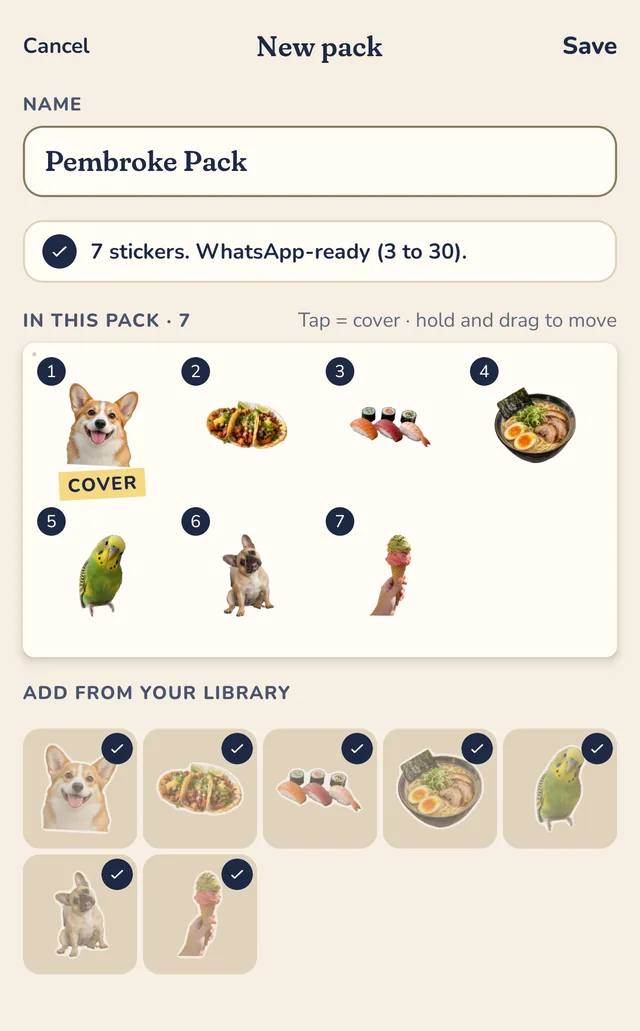
- Right after a batch, tap Make a pack and your new stickers are already in it. Later, go to Make, then Sticker pack (choose New pack if asked). Check the name.
- Under Add from your library, add or remove stickers until you have at least 3. Tap one to make it the cover. Hold and drag to reorder them, then tap Save.
- Open Send to and choose WhatsApp. PAPLO shows “Find it in the sticker tray in a chat”. It makes the 512 by 512 WebP files and the tray icon for you.
- Finish adding the pack in WhatsApp when it opens.
Where to find your pack
After adding the pack, find it in the WhatsApp sticker tray in a chat.
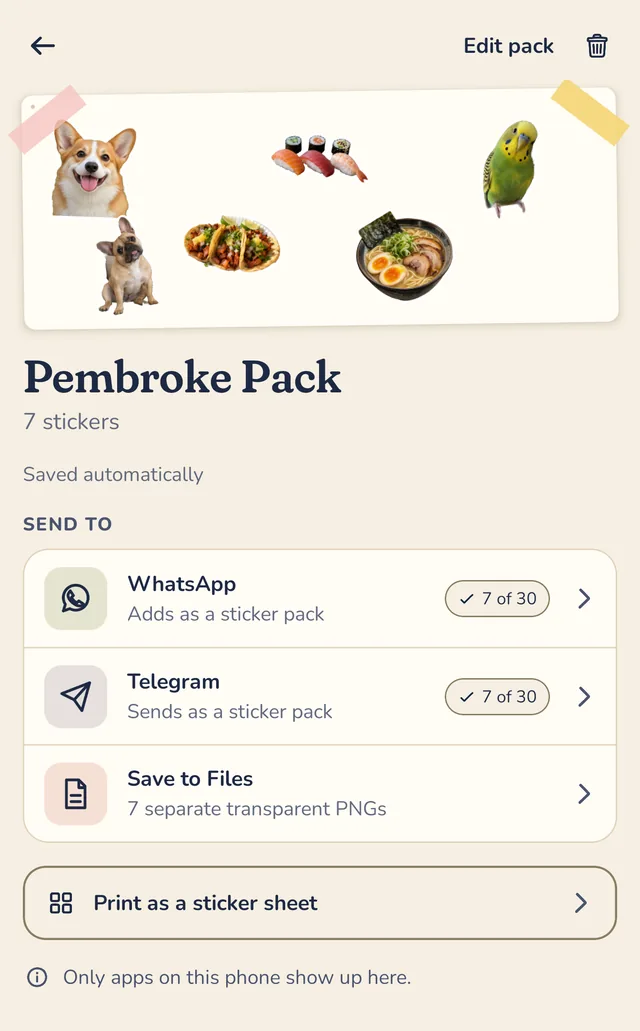
On iPhone and on Android the steps are the same. Only the way PAPLO hands the pack to WhatsApp differs behind the scenes.
Just one sticker? Open it in the editor, tap Share, and choose WhatsApp. On Android you will see a row of chat apps with WhatsApp in it. On iPhone, use More to pick WhatsApp from the share sheet. PAPLO sends the sticker as a transparent PNG.
Before you make your own, you can add a ready-made pack in the app: Chaos cat and Drama pug are both 24-sticker packs that are part of PAPLO Plus, and the WhatsApp sticker packs page lists more. For reactions, see our funny WhatsApp stickers.
When is WhatsApp’s creator better, and when is PAPLO?
| You want to… | Better pick |
|---|---|
| Make one sticker, right now, without installing anything | WhatsApp’s creator |
| Cut out 10 or 50 photos in one go | PAPLO |
| Give stickers a border or caption style | PAPLO |
| Build a pack with a cover and your own order | PAPLO |
| Send the same stickers to Telegram or iMessage too | PAPLO |
Neither one is “the right one”. If you only ever make a sticker now and then, stay in WhatsApp. If you are the friend who makes the group chat’s stickers, PAPLO is built for you.
What about Telegram or Android?
The same pack idea works elsewhere. See how to make a Telegram sticker pack from photos, make stickers on Android or make stickers on iPhone. All of our sticker guides are in one place. Stuck? Visit support.
Get PAPLO
Quick answers
How many stickers do I need for a WhatsApp sticker pack?
A pack added through PAPLO needs 3 to 30 stickers. WhatsApp’s own pack rule is the same range for packs built by sticker apps. A single sticker needs no pack at all.
What size and file type is a WhatsApp sticker?
WhatsApp’s developer notes ask for a 512 by 512 pixel image with a transparent background, under 100 KB for a static sticker. PAPLO makes those WebP files and the tray icon for you when you send a pack, so you do not need to resize anything.
Is there a free WhatsApp sticker maker?
WhatsApp has its own sticker creator inside the app. PAPLO is free to use for making and sending stickers, with an optional one-time PAPLO Plus purchase, no subscription and no watermark.
Can I make animated WhatsApp stickers with PAPLO?
No. PAPLO’s WhatsApp sticker packs are static. PAPLO can make GIFs that you send to a chat, but it does not add animated sticker packs to WhatsApp.
Sources
- WhatsApp Help Center: How to create and share custom stickers and sticker packs
- WhatsApp Help Center: About creating sticker packs for WhatsApp
Menus change between app versions. If a step looks different on your phone, the official page above is the final word.